Dungeon Master notes
DM notes have a peculiar problem: they are written in one mode and read in another. You prepare them alone on a Tuesday, in whatever order the ideas arrived, and then you have to find things in them at speed while five people wait and someone asks the name of the innkeeper.
Most prep fails at the reading end rather than the writing end. The notes are all there — somewhere in nine screens of a document — and none of it is reachable in the four seconds you have.
Free to start. DM-only notes are filtered on the server, not hidden in the interface.
Prep
Write it where you will look for it
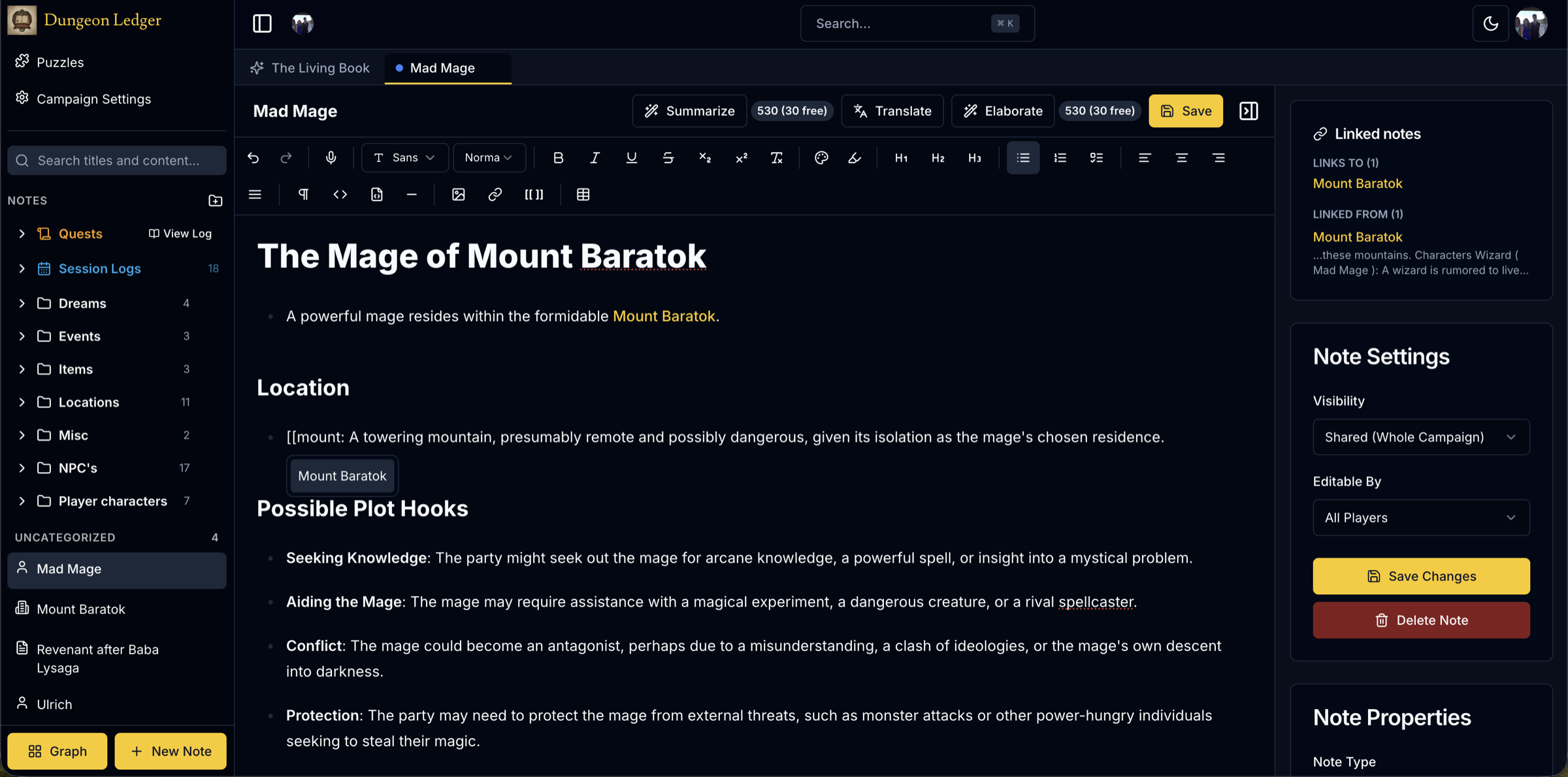
The unit is the note, not the session document. The innkeeper is an NPC note. The port is a location note. Tuesday’s prep links to both by typing [[, which means that when the party goes somewhere you did not expect, what you wrote about it is one click away rather than somewhere in a scroll.
This also survives the thing that kills linear prep: the party skipping it. Content written as connected entities keeps its value when it lands three sessions later than planned, because it was never tied to a particular evening.
Notes have types, so a glance tells you whether you are looking at a person, a place, a quest or a session — and the search covers bodies, not just titles, with tag:foo if you tag as you go.
Secrets
The one thing a shared document cannot do
DM-only and private notes sit in the same campaign as everything else. You are not maintaining a hidden file alongside a visible one, which is the arrangement that eventually goes wrong — usually by drifting out of sync, occasionally by being shared on the wrong screen.
Filtering happens on the server. A player’s browser never receives a note they are not permitted to read, so there is no hidden element in the page and nothing recoverable by anyone curious enough to look.
There is a secret note type as well, which is DM-only by nature and marked as such in the list, so the distinction is visible at a glance rather than something you have to remember you set.
Reveal
Turning prep into something the party keeps
When the party learns something, change the note’s visibility. What was DM-only becomes shared, and it arrives with its context intact — already linked to the location, the NPC, the session where they first heard the name. That is the reveal that would otherwise be a paragraph retyped into a different document with half the connections lost.
Because the notes were linked while you wrote them, the players end up with a genuine reference rather than a list of things you remembered to tell them. It builds itself as a side effect of prep you were doing anyway.
Version history covers the other direction: every note keeps its previous versions, so a note a player overwrites is recoverable rather than gone.
Between sessions
A short prep checklist that actually gets used
Long prep checklists don’t survive contact with a Tuesday that also has other things in it. This one is short on purpose — skip anything that does not apply this week rather than treating it as mandatory:
1. Reread last session’s log first, not your old plans — what actually happened should drive this week, not what you expected to happen. 2. Update the "unresolved" list: cross off what got answered, add what came up. 3. Check every NPC the party is actively tracking — do any of them need to act on their own this week, whether or not the party shows up? 4. Pick the one place the party is most likely to go next and make sure it has a location note, even a thin one. 5. Write or update one DM-only note for anything you are planning to reveal soon, linked to the NPC or place it concerns, so the reveal is a visibility change rather than something typed from scratch that night. 6. Skim the graph view for a node with a lot of connections and no recent activity — that is usually the thread you forgot was still open. 7. Decide the one thing that happens if the party does nothing this session, so a quiet week still moves something. 8. If you are running a balanced fight, check it against the encounter calculator rather than eyeballing it.
None of this requires finishing before the session — items 1, 2 and 6 take minutes and cover most of what actually breaks a game: contradicting what the players remember, and forgetting a thread that mattered to them even if it didn’t matter to you.
At speed
During the session
The graph view is the fastest answer to "what is this connected to?" — nodes by type, filterable, clickable through to the note. Three months in, that is a question you ask more often than you expect.
A DM toolkit fills the gaps the party opens: generate an NPC, a tavern, a quest hook or a balanced encounter when they walk somewhere you have nothing written. The Living Book answers questions about your own campaign from your own notes, which is faster than searching when you cannot remember what you called someone.
Around it: maps with pins, a dice roller, a shared inventory and kill counter, playable puzzles, and a soundboard the whole table follows on one clock.
Questions from DMs
- Can I keep prep completely private?
- Yes. Notes can be private to you or DM-only, and the filtering is enforced on the server — a player’s browser never receives the content. You can run an entire campaign’s prep in a shared campaign without any of it being visible.
- How do I reveal something to the party later?
- Change the note’s visibility from DM-only to shared. It appears for the players with its links intact, so the NPC, the location and the session it connects to come with it. There is nothing to copy between documents.
- What if a player edits a note I need?
- Every note keeps a version history you can restore from, and editing permission is separate from reading — so a note can be readable by the table and editable only by you. The history exists specifically because opening editing to all players is otherwise unrecoverable.
- Does it help with prep I never end up using?
- Somewhat, by making it reusable rather than wasted. Prep written as linked NPCs, locations and quests rather than as a session script keeps its value when the party goes somewhere else, because none of it was tied to a particular evening.
- Can I use it for a solo or play-by-post game?
- Yes. A campaign with one member works fine and everything except the live shared features behaves the same. The visibility model just becomes less relevant when you are the only reader.
More for Dungeon Masters
- D&D session notesWhat to record during a session, and how to keep it worth reading.
- D&D shared notesThe other half — what the table sees, and how.
- Keeping DM secrets separateWhere secrets actually leak from, and what to do about it.
- D&D campaign managerMaps, sessions, compendium and the rest of the toolkit.
Prep and improvise in the same place
Keep the secret note beside the shared one, and reveal it the session it finally matters.
Start your DM notebook