D&D campaign wiki
A campaign wiki is a good idea that usually dies at setup. Standing up a real wiki means choosing software, hosting it, configuring accounts for five players, and then maintaining it — and most of that work happens before the wiki contains a single useful sentence.
Dungeon Ledger gets to the same result from the other direction. You take notes normally, link them as you go, and the wiki is what those links add up to. There is no separate thing to set up and nothing to migrate into.
Free to start. Publish a finished wiki publicly, or keep it to the table.
Linking
The wiki builds itself as you write
Typing [[ opens a search over every note in the campaign; pick one and the link is made. Mention an NPC in a session log, link a location to the quest that happens there, point a player character at the faction they joined — each link takes about a second and is there permanently.
Because the links are made while writing rather than in a separate organising pass, the reference stays current. The usual failure mode of a campaign wiki is that it describes the campaign as of two months ago; this one describes it as of the last thing anyone wrote.
Notes come in seven types — player, NPC, location, quest, session, secret and plain — so entries are categorised without anyone having to agree on a tagging convention.
The graph
See your world as a map, not a list
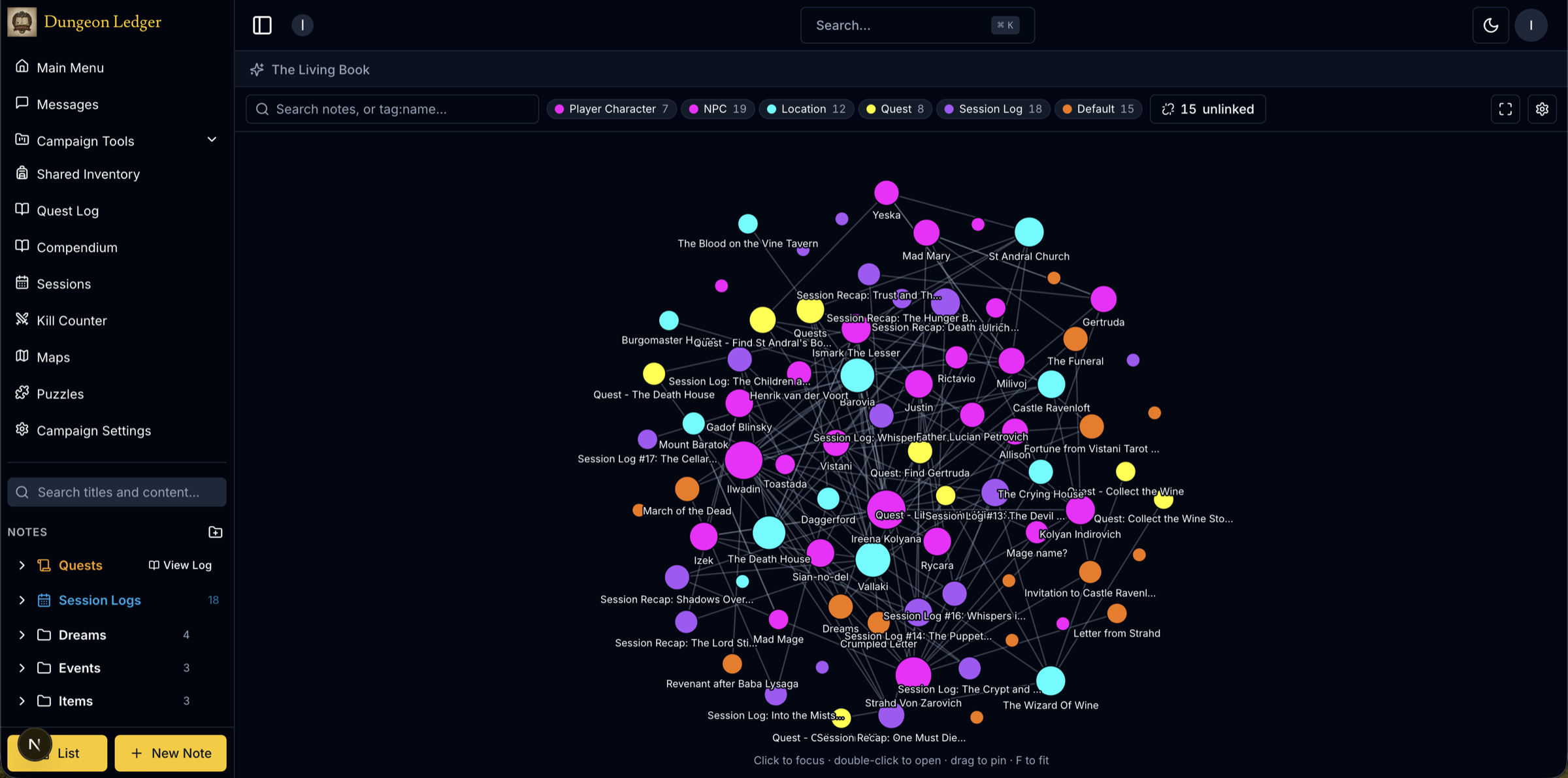
Every link feeds an interactive knowledge graph: nodes for characters, places, quests and sessions, colour-coded by type, connected by the links you made. You can adjust node size, spacing and charge, zoom around, and click any node to open its note.
This is where a linked wiki earns its keep. A list of eighty notes tells you nothing; a graph shows you that three apparently unrelated NPCs all connect to the same location, or that a quest thread has been dangling untouched for six sessions.
Worked example
What "three NPCs connect to one location" actually looks like
Take a session-twelve moment: the party has separately met a retired sailor in a tavern, a dockside moneylender, and a temple acolyte asking after a missing brother. None of those notes reference each other when they are written — they are three ordinary NPC notes, created weeks apart, each linked once to the harbour district location note because that is where each conversation happened.
By session twenty, opening the harbour location note shows all three as backlinks — not because anyone planned it, but because each NPC note happened to [[link]] to the same place. The graph draws it as one node with three lines running to it, which is the moment a DM actually notices the coincidence: the sailor, the moneylender and the acolyte’s brother all touch the harbour, and probably each other.
That is the difference between a wiki and a list. A list of eighty NPC notes never surfaces this — you would have to remember all three and think to compare them. A graph puts the shared node in front of you the next time you open any one of the three.
Nothing about this required tagging, a "related NPCs" field, or a planning session. It is a byproduct of linking each note to the place it actually happened in, which is something a session log gets written anyway.
Secrets
A wiki the players can read, with the parts they can’t
The reason most DMs don’t simply share their notes is that the notes contain the answers. Here, visibility is a property of each individual page: shared with the table, private, DM-only, or shared with named people.
So one wiki serves both purposes. The players get a genuine reference for the world they are exploring, and the entries explaining what is actually going on sit in the same structure, linked to the same nodes, invisible until you change one setting.
Filtering is applied on the server, so hidden pages are never sent to a player’s browser in the first place. Revealing something is a deliberate act, not a risk you are managing.
Writing
A proper editor, and help filling pages
The editor is full rich text: headings, tables, colours, highlights, task lists, code blocks, images and links, with templates for player characters, locations, NPCs, quests and session logs so a new page starts with a shape rather than a blank screen.
There is also an in-campaign assistant that answers questions strictly from the notes the asker is permitted to read — useful for "what do we know about the cult that keeps turning up?" when the answer is spread across nine sessions. It cannot see notes the person asking cannot see.
Questions about campaign wikis
- How do I make a D&D campaign wiki?
- The practical route is to take your notes in a tool that supports linking between them, and link as you write rather than organising afterwards. In Dungeon Ledger you type [[ to link one note to another, and the accumulated links become both a wiki and an interactive graph of your world — with no wiki software to install or host.
- Can players read the campaign wiki?
- Yes, and you decide page by page. Each note is shared with the table, private, DM-only, or shared with specific people, so the players get a real reference while the entries that explain the plot stay hidden until you reveal them.
- What is the knowledge graph for?
- It renders every link between your notes as an interactive map — characters, locations, quests and sessions as connected nodes, coloured by type. It makes long campaigns navigable and surfaces connections and dangling threads that a list of notes hides.
- Do I have to migrate my existing notes?
- No. You can start using it for the next session and link older material in as it becomes relevant. The wiki is cumulative, so it gets more useful the more you write, and does not require a bulk import to be worth anything.
A wiki you did not have to build
Write notes, type [[links]], and let the reference assemble itself as the campaign goes on.
Start building your wiki