D&D shared notes
Most D&D groups end up with notes in five places at once: the DM’s document, two players’ notebooks, a group chat nobody scrolls back through, and whatever someone remembers out loud at the start of the session. None of it is searchable, and half of it contradicts the rest.
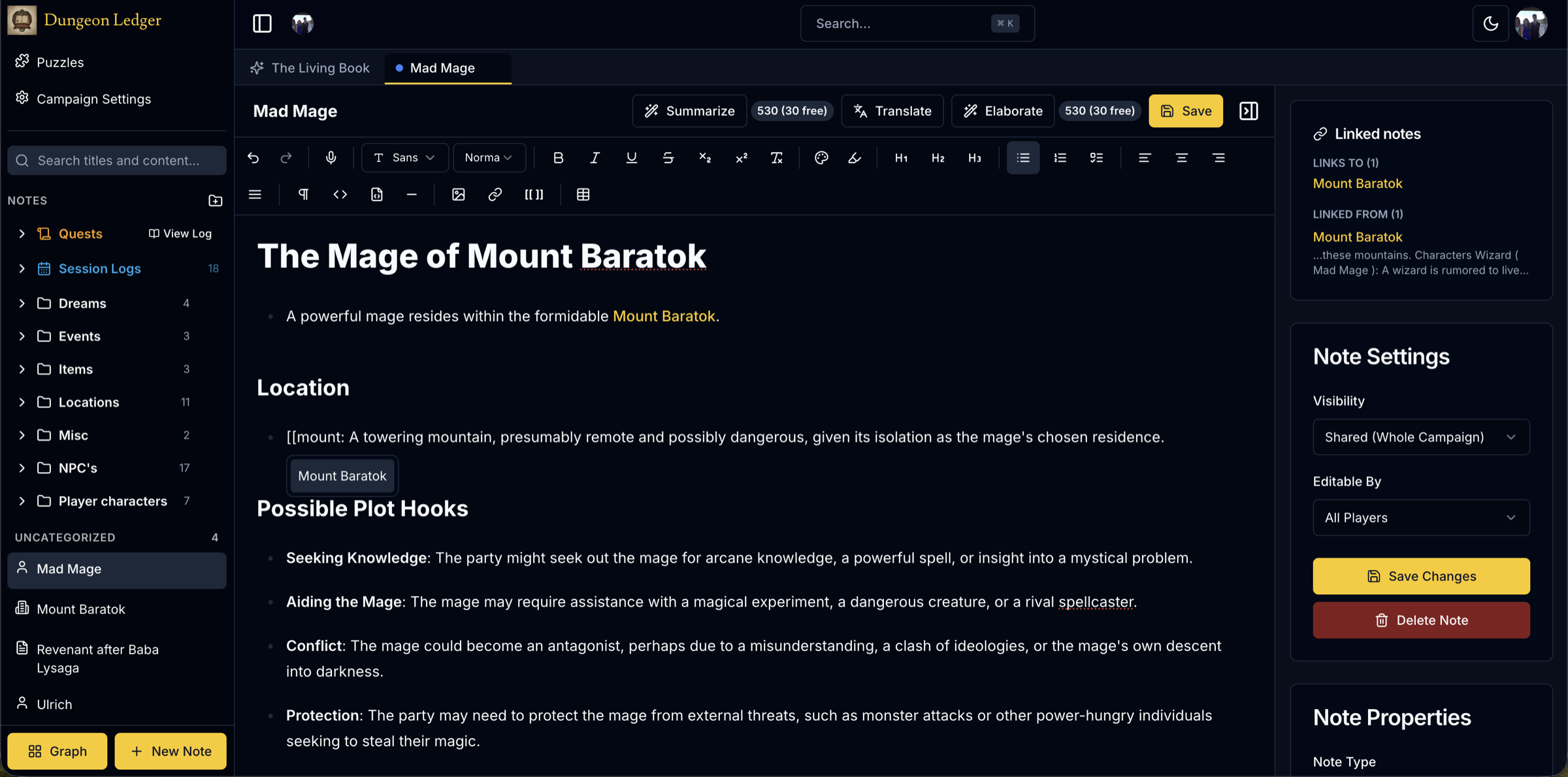
Dungeon Ledger is a shared notebook for D&D campaigns. Everyone writes into the same place, notes link to each other, and every note carries its own visibility — so the party wiki and the DM’s secrets can live side by side without you keeping two documents in sync.
Free to start. Six campaigns as a DM, and as many as you are invited to as a player.
The problem
Why shared D&D notes usually fail
A shared document seems like the obvious answer until the first time you need to write something the players shouldn’t read. From then on you are maintaining two files, and the moment they drift apart the shared one stops being trustworthy.
The other common failure is structure. A single long document works for three sessions and becomes unusable by session twelve, because there is no way to ask it who the party met in the port city two months ago or what they promised the harbourmaster.
What a group actually needs is one place, with permissions built into each note rather than bolted on, and links between notes so the campaign gains structure as you write instead of needing to be reorganised later.
Visibility
Every note decides who can read it
Each note has its own visibility setting: shared with the table, private to you, DM-only, or shared with named people. A player who opens the campaign sees the notes they wrote, the notes shared with everyone, and the notes shared specifically with them — nothing else.
That filtering happens on the server before anything is sent. A player’s browser never receives the content of a note they aren’t allowed to read, so there is no hidden element to inspect and nothing to accidentally reveal by sharing a screen.
Editing is a separate setting from reading. A note can be readable by the whole table but editable only by its author, or opened up to everyone, or handed to two specific players — useful for a party inventory the group maintains together.
Structure
Notes that link to each other
Typing [[ starts a link to another note. Mention an NPC in a session log and the link is there next session when you need to remember who they were. Over a campaign this builds a wiki of your world without a separate step where you sit down and organise anything.
The graph view draws those links as a map: characters, locations, quests and sessions as connected nodes, colour-coded by type. Clicking a node opens the note. It is the fastest way to answer "how does this connect to anything?" three months into a campaign.
Notes come in seven types — player, NPC, location, quest, session, secret and plain — so the structure is legible at a glance rather than depending on everyone naming things consistently.
Reference
Who can read what, exactly
Visibility is set per note, and it is worth being precise about what each setting actually grants, because "shared" and "custom" get confused in practice.
Shared (whole campaign): every member of the campaign can read it — the default for session logs, location notes and anything the party has actually learned. Editing is separate: a shared note can still be locked to its author.
Private: only the author can read it, including the DM. This is for a player’s own character notes and backstory drafts they are not ready to show anyone — the DM does not get a silent exception.
DM-only: only the DM can read it, regardless of who wrote it. This is where plot secrets, monster weaknesses and anything that would spoil a reveal live — never in a note merely marked "shared" with a mental note not to mention it.
Custom (named people): visible only to the specific people you pick — a note shared with two players and the DM, say, for a subplot the rest of the table isn’t part of yet. This is the setting most groups forget exists, and the one that replaces the side channel a DM would otherwise run outside the app.
Secret notes (a DM-authored type, distinct from the DM-only visibility setting) are excluded even from the campaign’s own AI assistant — the one place in the app where a DM’s own content is deliberately withheld from a DM-facing feature, because "the DM asked" is not the same guarantee as "no model ever saw it."
At the table
Built for a group, not one person
Everything syncs live, so a note written during the session is on every screen at the table as it is typed. It installs to a phone as an app, which matters more than it sounds when half your players are looking things up between turns.
Around the notes there is the rest of what a D&D group keeps in other tabs: an SRD compendium of monsters, spells, races and classes; session scheduling on a shared calendar; maps with pins linked to the notes describing them; a dice roller; and a shared soundboard the DM drives for everyone at once.
Questions about sharing notes
- Can my players see the DM’s notes?
- Only the ones you share. Every note has a visibility setting — shared, private, DM-only, or shared with specific people — and filtering happens on the server before content is sent, so a player’s browser never receives a note they aren’t permitted to read.
- Can the whole group edit the same notes?
- Yes, and you control it per note. Editing can be limited to the author, the author plus the DM, opened to all players, or granted to named people. Because visibility and editability are separate settings, a note can be readable by the table but editable by one person.
- Is it free for a D&D group?
- A free account lets you run up to six campaigns as a DM and join unlimited campaigns as a player, so a group only needs its DM to think about limits at all. Nothing in the app asks for a card.
- Does it work during an in-person session?
- Yes. It runs in the browser and installs to a phone or tablet as a progressive web app, and notes sync live, so anyone can write to the shared campaign from the table.
Related guides
- D&D session notesWhat to record during a session, and how to keep it worth reading later.
- D&D campaign wikiTurning scattered notes into a linked reference for your world.
- Tabletop campaign notesThe same approach for any system, not just D&D.
- Guides and writingPractical notes on running and recording a campaign.
Give the table one notebook
Create a campaign, invite your players, and share the first note before the next session.
Start a shared campaign