D&D note taking app
Nearly every D&D group starts in a general-purpose notes app — a shared doc, a Notion page, an Obsidian vault, whatever was already open. It works, right up until the campaign gets big enough to be worth having notes about.
The failure is always the same shape, and it is not about features. A general notes app assumes one author, or a group of authors who are all allowed to read everything. A campaign is the one situation where that assumption is false by design: the DM knows things the players must not, and the players know things about each other they might not share.
No card and no trial clock. The free tier is a real tier, not a countdown.
The wall
Where a general notes app stops working
The first crack is the secret. You need to write down what the cult is actually doing, and there is nowhere in the shared document to put it. So you make a second document, and now you own two files that have to agree with each other. They agree for about a month.
The second crack is retrieval. A general notes app searches titles well and bodies adequately, but it cannot answer "who did we meet in the port city?" because nothing in it knows that a person and a place are different kinds of thing, or that they were mentioned together.
The third is that nobody else writes in it. If the notes live in one person’s vault or one person’s account, the group has a scribe rather than a shared record — and when that person misses a session, the record has a hole in it.
The difference
Permissions per note, not per document
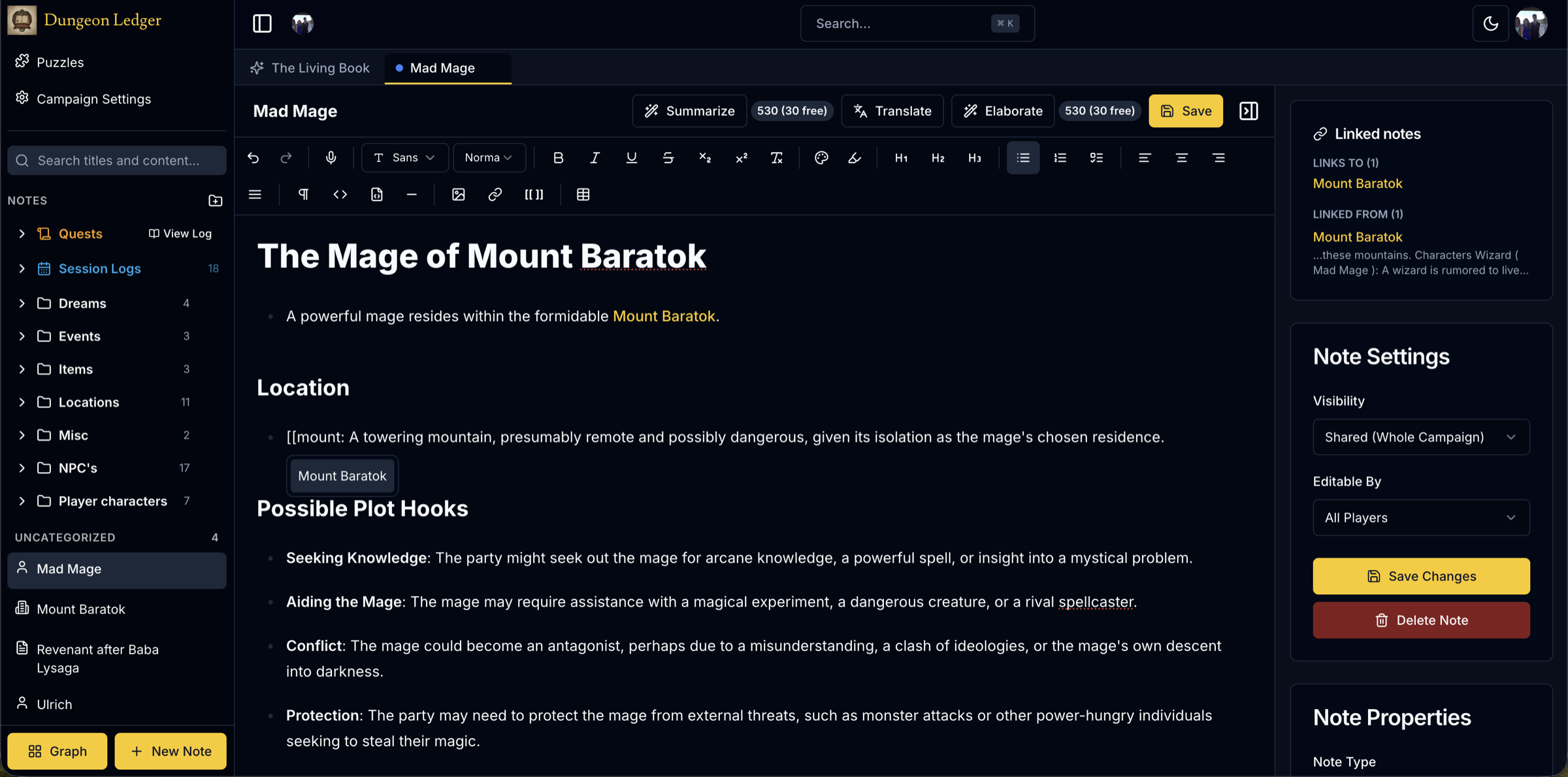
In Dungeon Ledger the unit of access is the note. Each one is shared with the table, private to you, DM-only, or shared with named people — and reading and editing are separate settings, so a note can be readable by everyone and editable by one person.
That removes the second document entirely. The secret and the summary of the same event live next to each other, linked to the same NPC, in one campaign. When the reveal happens you change a dropdown instead of copying text between files.
Filtering runs on the server before anything is sent, so a player’s browser never receives a note they are not permitted to read. There is nothing hidden in the page to inspect, and nothing to leak by sharing your screen.
Structure
The organisation happens while you write
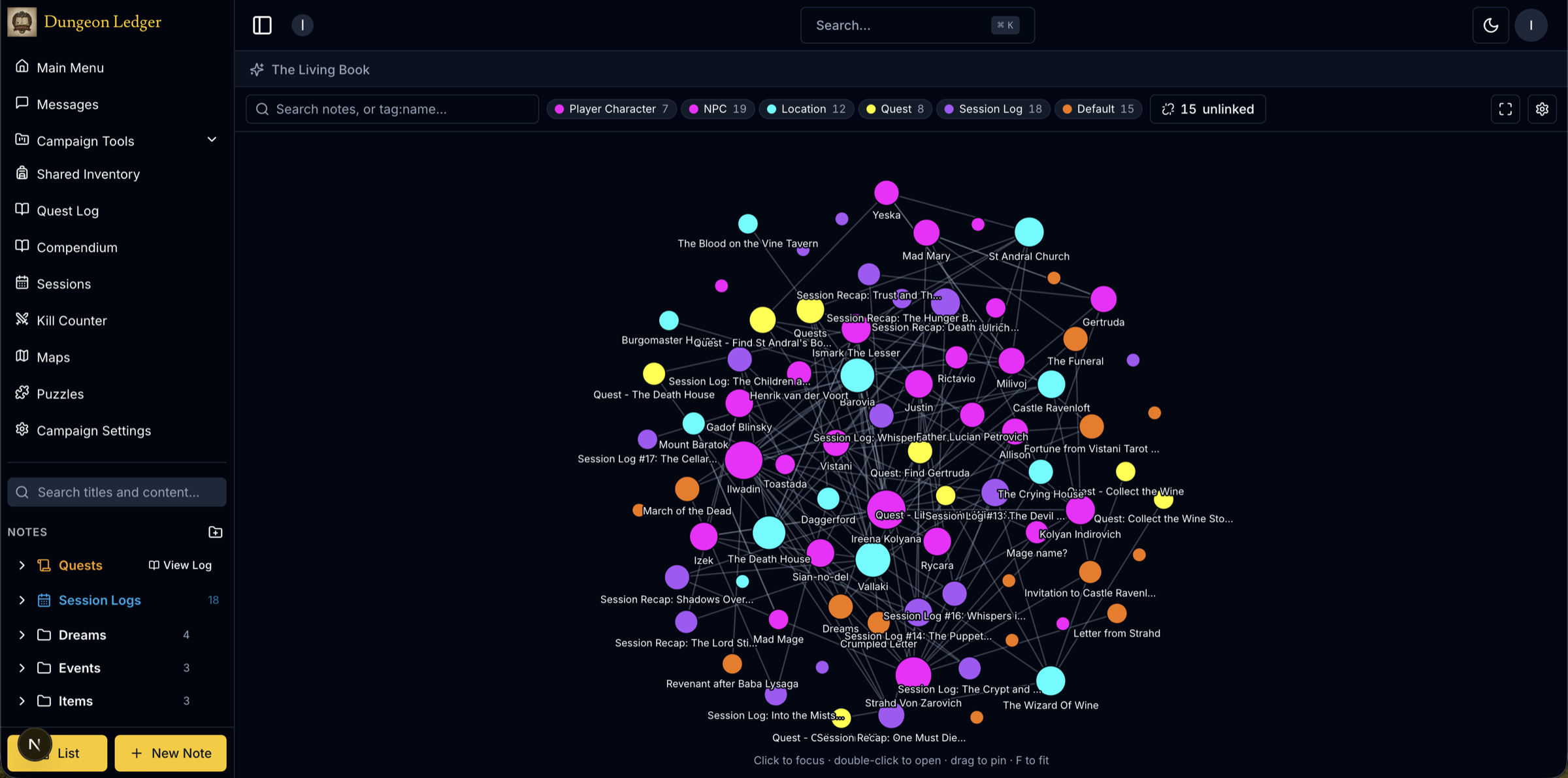
Typing [[ opens a search across every note in the campaign and links to one in a second. That speed is the whole trick — anything slower and people stop doing it mid-sentence, which is why the "we should keep a wiki" plan usually dies.
Because the links are real, the graph view can draw them: NPCs, locations, quests and sessions as connected nodes you can filter, search and click through. You get a map of your own campaign without ever having sat down to build one.
Notes have types — player, NPC, location, quest, session, secret — so structure does not depend on five people naming things consistently.
Comparison
Notion, Obsidian or Google Docs — what actually changes
All three are capable general tools, and none of them were built around the one thing a campaign genuinely needs: one document several people write into, where some entries are deliberately invisible to most of the group. What changes moving off each one is different, because each hits the wall differently.
Notion. A shared workspace with page-level permissions is close, but page-level is the wrong grain — a DM ends up either building a parallel "secrets" workspace and copying summaries across by hand, or giving up and putting everything in one page nobody is supposed to scroll past. Database views and relations are more setup than most groups will do for a hobby; note linking here is a `[[` away and the graph is drawn automatically, not modelled as a database.
Obsidian. Genuinely good at linking — `[[wikilinks]]` and its own graph view are close cousins of what this does. What it does not have is any server-side permission model at all: a vault is a folder on disk (or in a shared sync), so "hide this from the players" means a second vault, which is the two-sources-of-truth problem the whole app exists to avoid. It also has no concept of a second author writing into the same vault live during a session.
Google Docs. The default because it is already open in a tab. Comments and suggestions are not a visibility system — anyone with the link can scroll to any heading — so DM secrets live in practice in a second, separate document, and the two drift apart within a few sessions. Search is full-text only; it has no idea an NPC mentioned in session four is the same NPC referenced in session eleven unless the name is spelled identically both times.
What moving off any of them actually involves: you do not migrate a campaign wholesale. You start writing the next session here, paste in the handful of pages you still refer to, and let the old document become an archive nobody opens. Backfilling years of notes is a project that never finishes, so nobody does it, and that is fine — the new session log is what needs a home, not the old one.
Notes export back out as Markdown with front matter, per note or for a whole campaign, so nothing written here is trapped either — worth checking before committing a campaign to any tool, this one included.
It runs in the browser and installs to a phone or tablet as an app, which matters at an in-person table where people look things up between turns.
Questions about the app
- Why not just use Notion or Obsidian for D&D?
- Both are excellent general tools and both assume every reader may read everything. A campaign needs the opposite: the DM writes things the players must not see. Workarounds exist — a second vault, a separate database — but they are two sources of truth that drift apart, which is the specific failure this replaces.
- Can I import my existing campaign notes?
- There is no bulk importer. In practice groups start with the next session and paste in the few pages they still reference, because backfilling a long campaign is a job nobody finishes. Notes export as Markdown whenever you want them back.
- Does it work offline at the table?
- It installs as a progressive web app on a phone or tablet, but it is a live shared notebook and expects a connection — notes sync to everyone as they are written. It is not designed as an offline-first vault.
- Do my players need to pay or install anything?
- No. Joining campaigns as a player is unlimited on a free account, and it runs in a browser. Only the person running the game encounters a campaign cap at all.
- Is it only for D&D 5e?
- The notes, linking, graph and permissions are system-neutral and groups use them for other systems. The bundled compendium is 5e SRD content specifically, so that part is less useful outside 5e.
More on note-taking
- D&D shared notesHow per-note visibility lets one campaign hold both the wiki and the secrets.
- D&D campaign wikiTurning linked notes into a reference for your world.
- D&D campaign managerEverything around the notes — maps, sessions, compendium, soundboard.
- Free dice rollerNo account needed. Standard notation, every die shown.
Put the campaign somewhere it will keep
Set up your first campaign in a couple of minutes and see whether it survives contact with a real session.
Create a free account